 popamp
Winamp skins on Linux: how to use classic .wsz skins with Popamp
Thousands of classic Winamp skins are still out there, and most of them are a single .wsz file. Popamp, a free Winamp-style music player for Linux and Windows, opens them as they are. This guide shows how to put one on, where to find more, and what to do on a high-resolution screen.
What a .wsz file is
A .wsz skin is a renamed .zip archive of bitmap pictures: one for the main window's buttons, one for the equalizer, one for the playlist, and a few text files with colours. Popamp reads .wsz and .zip archives and unpacked skin folders. A picture that is missing or broken falls back to the default skin, so even old or half-finished skins load. It also reads viscolor.txt (the visualizer's colours), pledit.txt (the playlist's colours) and the skin's own mouse cursors.
1. Install Popamp
Debian and Ubuntu install it from Popamp's apt repository, Fedora and openSUSE from the openSUSE Build Service, and every other distribution can run the AppImage. The commands are on the install section of the front page. On Debian or Ubuntu, after adding the repository:
sudo apt install popamp2. Open a skin you already have
Press Alt+S to open the skin browser and choose the file, or copy your skins into Popamp's skins folder, where it finds them by itself:
~/.local/share/popamp/skins/On Windows the folder is %APPDATA%\popamp\skins\. Popamp remembers the skin you picked and starts with it next time.
3. Browse the Winamp Skin Museum from the player
If you have no skins on disk, open Skins › Skin Museum. It browses and searches the Winamp Skin Museum, a public archive of classic skins, and downloads the one you choose. Popamp talks to the museum only while that window is open.
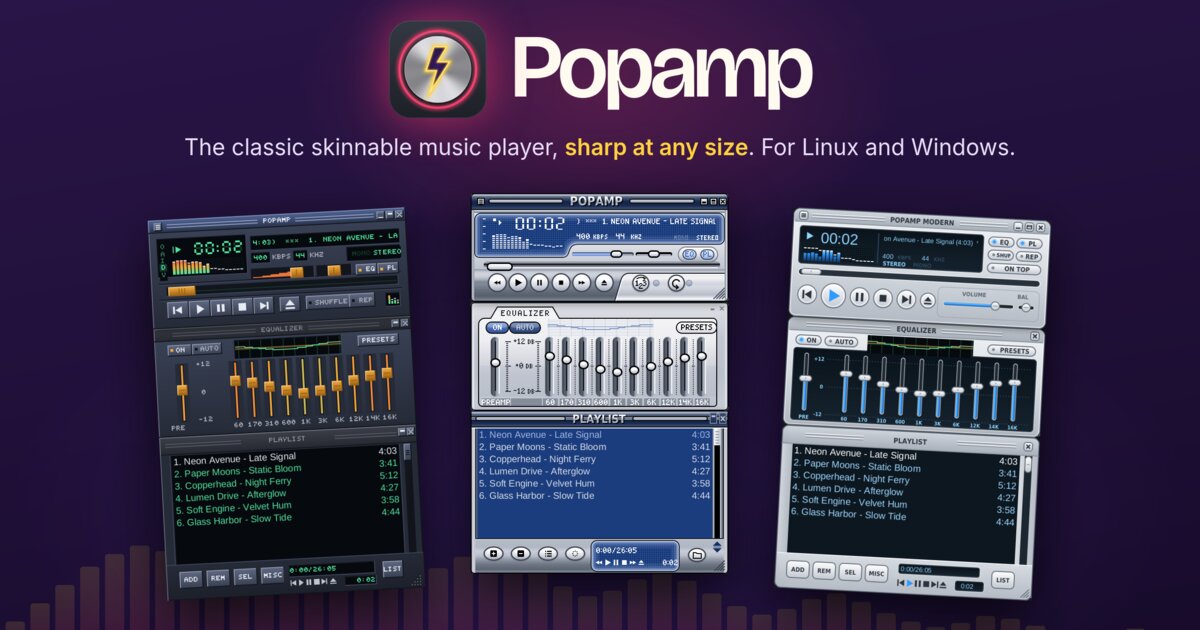
.wsz skins fit the same three windows.4. On a HiDPI screen
Classic skins are drawn for a 275-pixel-wide window, which is tiny on a 4K monitor. Ctrl+D switches to double size, and the other window sizes go up to ×3, fractional ones included. At a fractional size Popamp averages the skin's pixels, so there are no uneven pixel steps, but a bitmap made larger is never as crisp as the original. If you want a player that stays sharp at any size, try Popamp's vector skins (.psz): they are drawn in SVG and stay crisp from ×1 to ×3. More of them are in the skin gallery, and Skins › Gallery installs them from inside the player.
What classic skins do not do
- Toolbar mode. Popamp can turn its main window into a bar along the screen edge, like a taskbar. Classic skins have no picture for that bar, so it needs one of Popamp's own skins: the built-in one, Modern, Steel, Classified or D11.
- Modern skins. The later
.walformat, with its scripted windows, is not supported.
Popamp contains no Winamp code or artwork, and it is not affiliated with Winamp. The skins in the Skin Museum belong to their authors.