 popamp
A music player as a taskbar: Popamp's toolbar mode on Linux and Windows
A floating player window gets lost behind everything else. In toolbar mode, Popamp, a free Winamp-style music player, becomes a strip along the top or bottom edge of the screen instead. The strip keeps its room the way a taskbar does, so maximized windows stop at it rather than covering it, on Linux and on Windows.
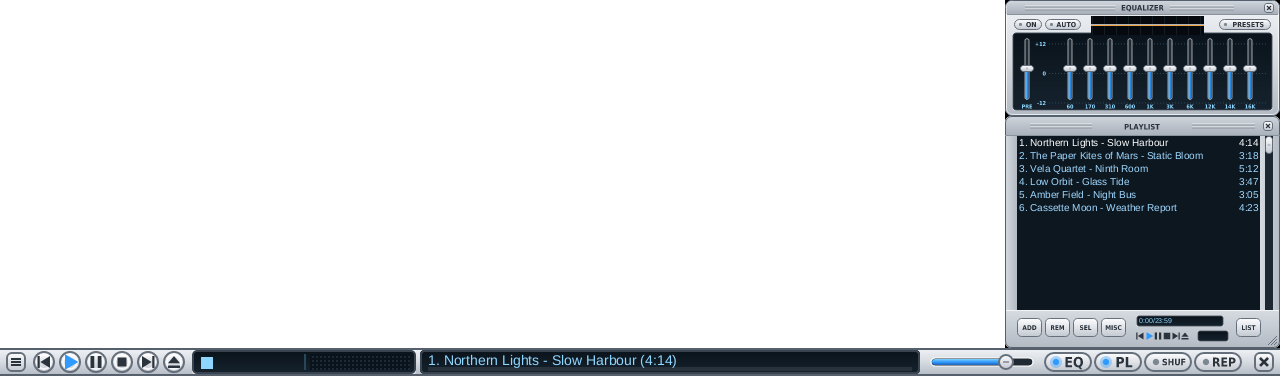
What is on the bar
The whole player fits in one strip across the full width of the screen. It holds the transport buttons, the visualizer, a clock, the scrolling track title and the volume. It also has the switches for the equalizer, the playlist, shuffle and repeat. The equalizer and the playlist sit against the bar at its right end. If you drag one of them away, it stays where you put it until you turn the bar off.
Turn it on
Open the main menu and choose Toolbar mode. It has three items:
- On / Off switches the bar.
- Position puts it at the top or the bottom of the screen.
- Size runs from ×1 to ×3. It is set apart from the size of the other windows, so the bar can stay slim while the playlist is large.
You can choose the position and the size before you turn the bar on. Turn it off and the main window comes back as an ordinary window.
Room kept, like a taskbar
On Linux, Popamp reserves the strip with the standard _NET_WM_STRUT_PARTIAL hint, the same one desktop panels use. The window manager then treats the bar as part of the screen's edge: a maximized window ends at the bar instead of going under it. If your desktop already has a panel at that edge, such as GNOME's top bar or a KDE or Xfce panel, the bar sits inside it rather than on top of it.
On Windows the bar is an application bar, the same kind of window as the Windows taskbar, so Windows makes room for it in the same way.
Wayland
On most Wayland desktops, GNOME and KDE Plasma among them, Popamp runs through Xwayland, and there the bar works as it does on X11. On COSMIC (Pop!_OS 24.04), and on desktops without Xwayland, Popamp runs as a Wayland program. There the bar is a layer of the desktop: maximized windows still stop at it, but it takes no keys, so use the mouse, the media keys or the global hotkeys. GNOME offers no such layer to a Wayland program, so there the bar is available only through Xwayland, which is GNOME's default.
Which skins have a bar
A bar needs pictures of its own, so it comes from the skin. Popamp's built-in skin and the Modern, Steel, Classified and D11 skins each draw a bar next to their window, in every one of their colour sets. They are in the skin gallery, and Skins › Gallery installs them from inside the player. Classic Winamp .wsz skins have no bar; how to use them is in Winamp skins on Linux.
If you make skins, the bar is a [window.bar] section in the skin's skin.toml, described like the normal window. The skin format has the details.
Popamp contains no Winamp code or artwork, and it is not affiliated with Winamp.