 popamp
Popamp 1.2: a Winamp-style music library with covers and a folder tree
Popamp 1.2 is out, and most of it is about the media library. The library window now has its own display and transport buttons, plays music without touching your playlist, shows the cover of the track you are on, and lets you walk through your music folder by folder. Here is what changed.
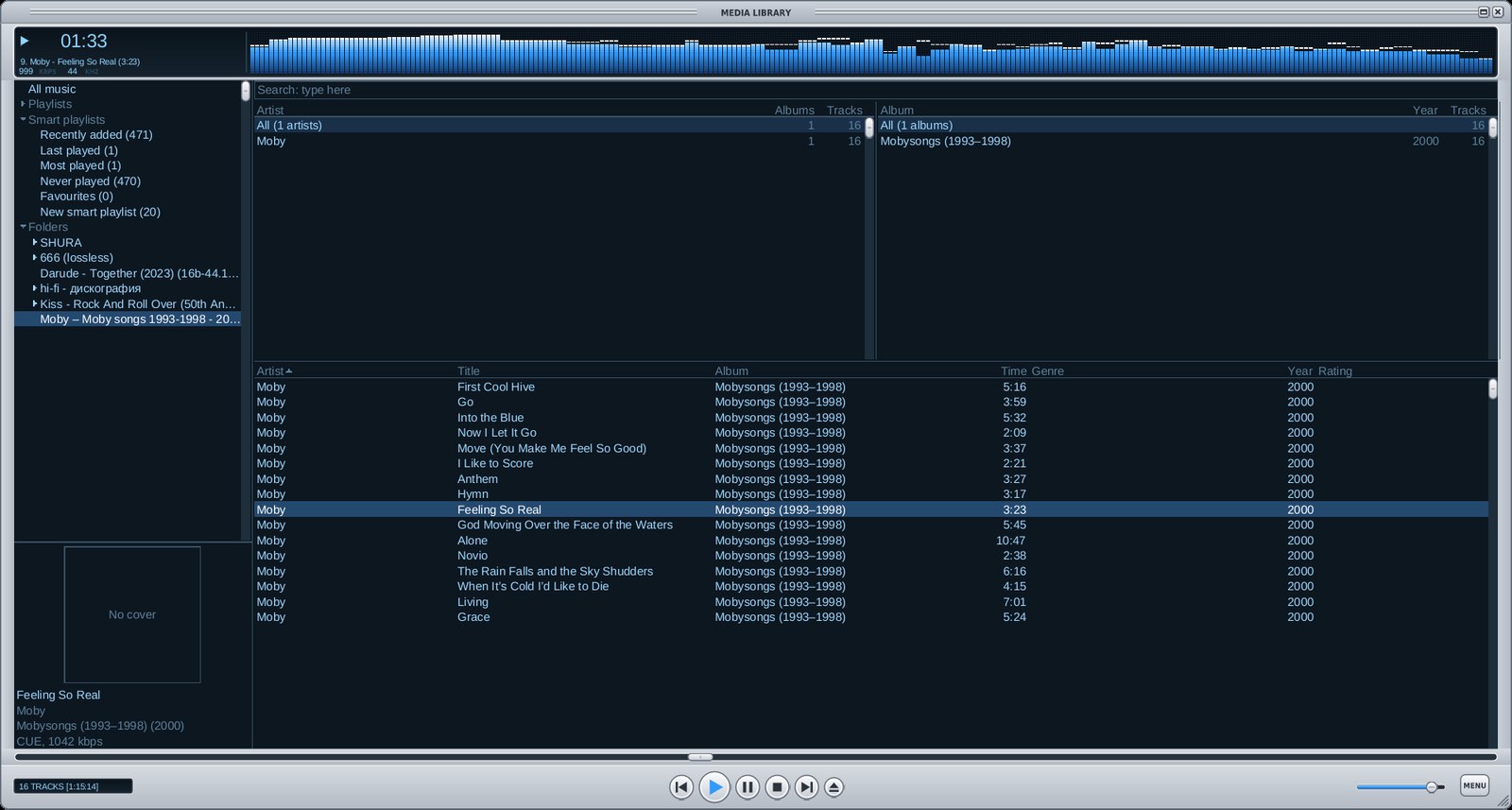
A player of its own
Under its title, the library window now has a display like the main window's: the play state, the clock, the song title, the bit rate and a visualizer. Under the track list there is a position bar, the transport buttons and the volume.
The library also plays on its own, apart from the playlist. Double-click a track or press Enter to play it. While the library is playing, one click on another track switches to it. Your playlist stays as it was. To add a track to the playlist, click it with the middle mouse button or press Shift+Enter; Ctrl+click still picks several tracks.
Room to work
- Maximize it. Double-click the library's title, or choose Maximized in its menu. It fills the free part of its monitor, and it opens maximized again next time.
- Make each part as big as you like. Drag the gap to the right of the left panel, or the gap above the track list, to share the room between the tree, the artists and albums, and the tracks. A double click on a gap sets it back.
- Fewer buttons. The Play, Enqueue, Add folder and Rescan buttons under the list are gone; all of them are in the library's menus. The library has no shade mode any more, since a double click on its title now maximizes it.
Covers
A new cover panel under the tree shows the cover of the track at the cursor, with its title, artist, album, year, format and bit rate.
To give tracks a cover, drop a picture (JPEG, PNG, GIF or BMP) on a track, on several picked tracks, or on the cover panel. Popamp asks before it changes anything, and it writes covers only into the formats whose tags it can write. Nothing else in the library writes to your audio files: plays and ratings stay in Popamp's own files.
Browse by folder
The tree on the left now opens and shuts: Playlists, Smart playlists and Folders. A library folder opens into the folders inside it, so the track list can show any folder of your collection. That helps with albums whose tags are missing or messy, where browsing by artist and album does not find them. The tree comes back as you left it.
More columns
The track list can now also show the track number, the file name, the comment, the bit rate, the play count, when a track was last played and when it was added. Right-click the column header to turn columns on and off, and drag the borders in the header to change their width.
A library that keeps itself up to date
Media Library preferences have two new check boxes:
- Scan the folders at startup: on by default. It was there before, but only in the settings file.
- Scan the folders periodically: off by default, every 60 minutes once you turn it on. A scan of a large library keeps the disk busy, so you choose.
Each scan takes in new and changed files and drops the ones gone from disk. A folder that cannot be read, such as an unplugged drive, keeps its tracks. Thanks to the user who asked for it in issue #71.
New in 1.1, in case you missed it
Two days ago Popamp 1.1 gave the library play counts, 0 to 5 star ratings and smart playlists: lists that pick tracks by rules such as artist, genre, plays, rating or when a track was added. Recently added, Last played, Most played, Never played and Favourites are built in, and you can make your own in a rule editor.
Get it
Popamp 1.2 is on the install page for Linux and Windows, and in the apt repository. The macOS disk images of 1.2 are not ready yet, so the Mac download is still 1.1 for now (more in Popamp on a Mac).
Popamp's own vector skins got matching library windows in skins 2.1.0. Get the new versions from the skin gallery.
Popamp contains no Winamp code or artwork, and it is not affiliated with Winamp.