 popamp
One player, four Linux desktops: a day of bug hunting in VMs
Popamp is a Winamp-style player made of several small windows. The equalizer and the playlist dock to the main window, snap to the screen's edges and move as a group, and in toolbar mode the whole player becomes a strip along the edge of the screen. All of that depends on the desktop: on how it places windows, keeps room for panels and passes on the mouse. One bug report sent us through four Linux desktops in a day. This is what each of them turned up, and how it ended in Popamp 1.0.2.
It started with one bug report
A user on Pop!_OS wrote in issue #51 that Popamp's windows could not be moved with the mouse. Pop!_OS 24.04 runs COSMIC, a new desktop written from scratch in Rust, and none of us had it at hand. Popamp had been checked on KDE Plasma under Fedora, its developers' own desktop, and on Windows through Proton. The rest of Linux was a matter of trust.
So rather than guess, we set out to see it with our own eyes, on COSMIC and, while we were at it, on the desktops most people actually use.
The test bench: live images and a remote hand
Every major distribution ships a live image that boots straight into its desktop. We ran them in QEMU with KVM, with no virtual disk at all: each start is a fresh system, and nothing from the previous run can leak into the next. The images were Ubuntu 26.04.1 (GNOME), Kubuntu 26.04.1 (KDE Plasma), Linux Mint 22.3 (Cinnamon) and Pop!_OS 24.04 (COSMIC).
QEMU has a control socket, QMP, that can take a screenshot of the guest's screen, type text, press keys and move and click the mouse. A small script wraps it, so a test step reads like qmp.py drag 300 200 900 200 1280 1024: drag from one point to another on a screen of that size. A tiny web server on the host gives the guest the fresh build of Popamp and the packages it needs, and takes back its logs. The loop is short: build on the host, run one command in the guest, which fetches the build and restarts the player with its settings kept, then look at the screenshot.
The bench had its own bugs. Clicks missed until we learned that each guest has its own screen size (1280×800 on Ubuntu, 1280×1024 on Kubuntu, 1280×768 on Mint) and passed the real one to every command. Fast drags were lost, because a desktop needs to see the mouse move before it believes a drag; one such drag landed on the equalizer's slider instead of its title bar. Pauses between the steps fixed that.
COSMIC: a window that will not move
Popamp runs as an X11 program through Xwayland on most Linux desktops, because X11 lets a program place its own windows and Wayland does not. On COSMIC the windows stood still. To tell a bug in Popamp from a bug in the desktop, we wrote a test of forty lines: open a plain X11 window, then ask for it to be moved twice.
GNOME's Mutter, KDE's KWin and Cinnamon's Muffin moved the window both times. COSMIC's Xwayland left it where it was first shown. No program can drag its windows there under X11, so the bug is in the desktop. We reported it to the COSMIC developers as cosmic-comp#3096, with the test attached.
Waiting for a fix was no answer for our user, so on COSMIC Popamp now runs as a native Wayland program. That turned up a chain of smaller bugs, each found by looking at the screen:
- The equalizer and the playlist did not show. They were subsurfaces of the main window, and COSMIC clips every window to its rounded outline, so whatever lay outside the main window was cut away. As popups of the main window they show in full.
- Dragged windows ran away at the edge of the screen. COSMIC reports the mouse's position against a popup that has already moved, so each step added to the last. Popamp now follows the mouse's relative motion while the button is held.
- Double size did nothing. COSMIC calls every floating window "tiled", and the window library Popamp uses then ignores a new size. We fixed it in our own copy of the library and offered the fix upstream as winit#4847.
- A window dropped in a corner of the screen grew to a quarter of it. That is COSMIC's corner tiling. The same fix keeps Popamp's window at its own size.
Snapping came last. COSMIC tells a program where its main window is, and an invisible layer measures how much room the desktop's panels take. With both, the equalizer and the playlist snap to the screen's edges and stop at the panels, as on X11. What Wayland itself withholds, such as remembered window positions and "always on top", is listed with the reasons on the Wayland page of the docs.
Ubuntu: the corner beside the dock
On Ubuntu the windows docked, dragged and snapped as they should. Toolbar mode did not look right. With the bar at the bottom, Ubuntu's dock gets shorter and ends above the bar, but the desktop still tells programs that the dock takes the whole left edge. Popamp keeps its bar inside the room it is told is free, so an empty square was left under the dock.
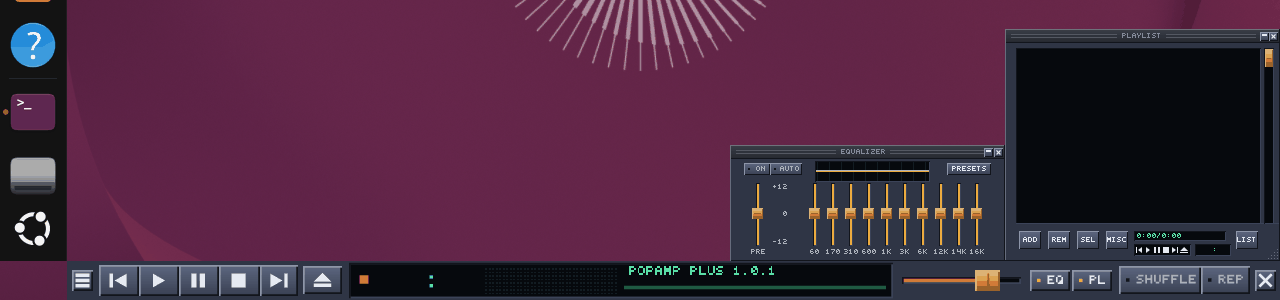
Popamp cannot see that the corner is free, because the desktop never says so. So the user can say it: Toolbar mode › Full width, under side panels lets the bar span the screen. It is off at first, since a dock that does not make room would cover the bar's end. The same screen showed a second bug: at double size, beside the dock, the bar was wider than the room left for it, and its right-hand buttons fell off the screen. The bar now takes the biggest size that fits, and the size menu offers only those.
KDE Plasma: windows under the bar
On Kubuntu a maximized window went under the bar. A program reserves a strip of the screen with a "strut", which tells the window manager to keep other windows out. KWin, running on Wayland, does not look at the struts of programs that run through Xwayland. Its own list of supported features leaves them out.
Plasma does support the Wayland way of reserving space, a layer surface with an exclusive zone. So when the window manager takes no struts but the desktop has layers, Popamp opens a Wayland connection of its own beside its X11 windows and places an invisible layer, one pixel high and transparent to the mouse, at the bar's edge. The layer reserves as much room as the bar takes. Maximized windows now stop at the bar, at the top and at the bottom:

Two things stayed as they are, because they are Plasma's own behaviour. Plasma lays out the desktop icons without minding other programs' panels, so a bar at the top covers the first row of icons. And after the desktop shell restarts, a window that was maximized can sit under the bar until it is maximized again. The KDE page of the docs shows both, with ways around them.
Linux Mint: plain X11 just works
Linux Mint's Cinnamon runs on plain X11, the oldest and simplest case. The strut worked as it was, at the top and at the bottom, the desktop icons moved out of the bar's way, and the new Wayland layer correctly stayed off. Finding nothing is a result too: it showed that the KDE fix had not broken the one setup that needed no fix.
What came out of it
Popamp 1.0.2 was released the same evening. It runs as a Wayland program on COSMIC, with dragging, snapping and double size, and moves the whole docked group from any of its windows when Options › Move docked windows together is on. The bar keeps maximized windows out on KDE Plasma, can span the screen under Ubuntu's dock and always fits on the screen. The desktop's own quirks now have pages in the docs instead of living in somebody's head, and the bench stays: when Popamp learns something new about its windows, each of these desktops sees it before a release does.
If Popamp misbehaves on your desktop, open an issue. As this one showed, a single report can be enough to fix it.